An app remembers things, it has “hidden” memory. Think of it like a spreadsheet of data in the app’s private “brain”. You, the programmer, control the memory. When you drag a component (e.g., button, text box) into your app, each of the components has a set of properties. These properties are “spreadsheet” cells that you can change. You can also define new “spreadsheet” cells called variables when you need to remember something. You define a variable when there isn’t a component property for storing the information you need. Check out these examples of using variables to remember things:
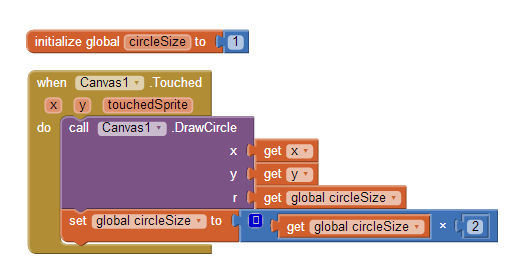
Example 1. How do you make it so that each time the user clicks a larger circle is drawn?
example 2When Canvas1 is touched, DrawCircle is called to draw a circle at the touch location (x and y). The radius r cannot be a fixed number as we want a different-sized circle each time. The variable circleSize is used to keep track of-- to remember-- the size of the circles each time we draw one. circleSize is initialized to 1 so the first circle drawn is a small dot. At the bottom of each Canvas1.Touched event handler, circleSize is doubled. So the second time the circle will be of radius 2, then 4, then 8, etc. The variable circleSize is needed because there is no component property that can be used. The component Canvas has a lineWidth property, so if you were drawing lines you wouldn’t need to define a variable. But Canvas doesn’t have a circleSize property, so you must define it as a variable. Want to get a better understanding of what a variable is? Check out this Khan Academy video.