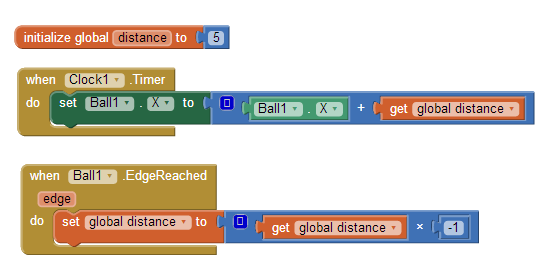
Example 2. How do you make a ball go back and forth across the screen?
example 1In this example, a variable distance is defined so the app can remember (keep track of) the current direction the ball is moving. You want the ball to move on each clock timer event, so the ball’s horizontal location (Ball1.X) is changed (set) within the Clock1.Timer event handler. The complicated part is you don’t always want to move the ball the same amount. When the ball is moving to the right, you want to add a positive number (e.g., 5) to Ball1.X. When the ball is moving to the left you want to add a negative number (e.g., -5). The amount you add to Ball1.X is dependent on the direction the ball is moving.
To remember which way the ball is going, you define the variable distance. distance is initialized to 5, so when the app starts each timer event moves the ball to the right. When the ball hits the (right) edge, Ball1.EdgeReached is triggered, and distance is set to itself times -1, or -5. In other words, its sign is flipped. Because distance is -5, the next timer events cause the ball to move left. When the ball hits the left edge, Ball1.EdgeReached is triggered again, the sign of distance is flipped again, back to 5, and the ball begins moving right. This behavior continues so that the ball moves back and forth forever.
Note: there are many ways to code this back-and-forth behavior and some that don’t include using a variable.